
Download Tunebanda – Google Drive Music Player, Playlist, Last.fm Integration
Overview
Tunebanda is a desktop software application designed to transform your Google Drive into a fully functional music library and player. By integrating directly with Google Drive, the software enables users to access and play their personal music collections—comprising MP3, AAC, M4A, and other supported formats—directly from the cloud. Once files are uploaded, Tunebanda automatically organizes them into an intuitive, visually appealing interface, turning any web browser into a capable music playback environment.
The software is ideal for music enthusiasts who store their collections in the cloud and seek a seamless way to browse, play, and manage their tracks without relying on traditional local storage. It offers real-world utility for remote access, multi-device users, and those who prioritize file organization and playlist management. The integration with Last.fm allows users to scrobble their listening activity, adding a layer of personalization and music discovery.
Tunebanda Inc. developed the software with a focus on simplicity and accessibility. While specific details about the company’s background are not provided, the product’s design suggests a user-centric approach aimed at streamlining cloud-based music consumption. The tool supports FLAC and OGG formats, with ongoing development indicating future enhancements.
Key Features & Capabilities
- Google Drive Integration: Automatically scans and indexes music files uploaded to Google Drive, creating a centralized library accessible from any device with internet access.
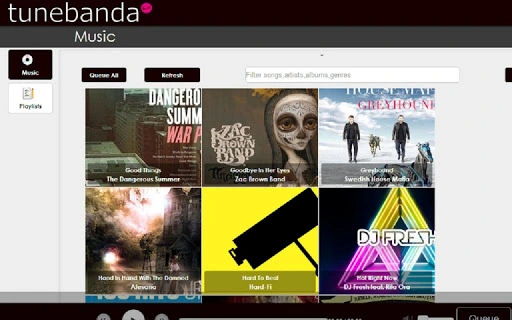
- Intuitive Music Library: Displays songs in a clean, grid-based layout, making it easy to browse and locate tracks by title, artist, album, or genre.
- Playlist Management: Users can create and manage playlists either from their collection or the current playback queue, with options to save and organize them via the playlist tab.
- Album Art Integration: Automatically fetches album artwork from Last.fm for most songs, enhancing the visual experience and aiding quick identification.
- Playlist Export: Supports exporting playlists as M3U files, enabling compatibility with other media players and devices.
- Scrobbling Support: Connects to Last.fm to log listening history, helping users track their music habits and discover new artists based on their preferences.
- Format Support: Native support for MP3, AAC, M4A, with ongoing development for FLAC and OGG file compatibility.
These features collectively streamline the process of managing a cloud-based music collection. For example, a user can upload a folder of MP3s to Google Drive, and Tunebanda will instantly build a searchable library. From there, they can create a playlist for a workout, export it as an M3U file for use on a different device, and scrobble the tracks to Last.fm—all without transferring files locally.
User Interface, Workflow & Performance
Tunebanda features a modern, browser-based interface that prioritizes visual clarity and ease of navigation. The layout is structured around a central music library displayed in a grid format, with sidebar panels for filtering, playlist management, and playback controls. Navigation is intuitive, with clear labels and responsive interactions that minimize user friction.
Workflow efficiency is enhanced by the automatic indexing of Google Drive files, eliminating the need for manual library setup. Users can filter their collection by title, artist, album, or genre using built-in search tools, allowing for quick access to specific tracks. The playlist tab enables seamless creation and management, with drag-and-drop functionality and real-time updates.
Performance details were not specified by the developer. However, given the browser-based architecture and reliance on cloud storage, the application’s responsiveness depends on internet speed and Google Drive’s performance. The developer did not provide additional system requirements or resource usage data. General software behavior suggests stable operation under typical conditions, though performance may vary based on network connectivity and file size.
Compatibility & System Requirements
Tunebanda is compatible with Windows, Mac, and Linux operating systems, making it accessible to a broad user base across different platforms. The software is distributed as a desktop application with a file size of 100 MB, indicating a lightweight footprint suitable for most modern machines.
Exact system requirements were not listed by the developer. However, the application’s reliance on a web browser and Google Drive integration suggests it requires a stable internet connection, a supported web browser, and access to a Google account. The software is designed to function within the constraints of cloud-based file access, meaning local hardware specifications are less critical than consistent network availability.
Pros and Cons
Pros
- Seamless integration with Google Drive for cloud-based music access
- Beautiful, grid-based music library with album art from Last.fm
- Powerful playlist creation and management tools
- Support for M3U export for cross-platform compatibility
- Scrobbling to Last.fm for personalized music tracking
- Free to use with no licensing fees
- Cross-platform support for Windows, Mac, and Linux
Cons
- Dependent on stable internet connection and Google Drive availability
- Performance may vary based on network speed and file size
- FLAC and OGG support is still in development
- No offline playback mode available
- Resource usage details not publicly disclosed
FAQ Section
Is Tunebanda compatible with all versions of Windows, Mac, and Linux?
Tunebanda supports Windows, Mac, and Linux operating systems. Specific version compatibility was not provided by the developer.
Can I use Tunebanda without a Google Drive account?
No, Tunebanda requires a Google Drive account to access and manage music files stored in the cloud.
Is the software safe to download and use?
As a cloud-based application with Google Drive integration, Tunebanda operates within standard security protocols. Users should ensure they download the software from official sources to maintain security.
Does Tunebanda support offline playback?
Currently, Tunebanda requires an active internet connection to stream music from Google Drive. Offline playback is not supported.
How often are updates released?
Update frequency was not specified. The developer continues to enhance functionality, including ongoing support for FLAC and OGG formats.
Final Thoughts + CTA
Tunebanda delivers a streamlined, elegant solution for users who store their music collections in Google Drive. Its intuitive interface, robust playlist tools, and integration with Last.fm make it a compelling choice for anyone seeking a cloud-first music player. While it relies on consistent internet access and lacks offline capabilities, its free model and cross-platform availability offer significant value.
For music lovers who prioritize accessibility, organization, and cloud synchronization, Tunebanda stands out as a reliable and user-friendly tool. With ongoing improvements and a growing feature set, it continues to evolve into a powerful desktop utility.
Download Tunebanda now







